
Static vs Dynamic vs Headless: What Do You Actually Need?
Not every business needs a complex stack. We break down static, dynamic, and headless in plain language — cost, speed, scale, and who each is best for.
Think about how food gets to the table
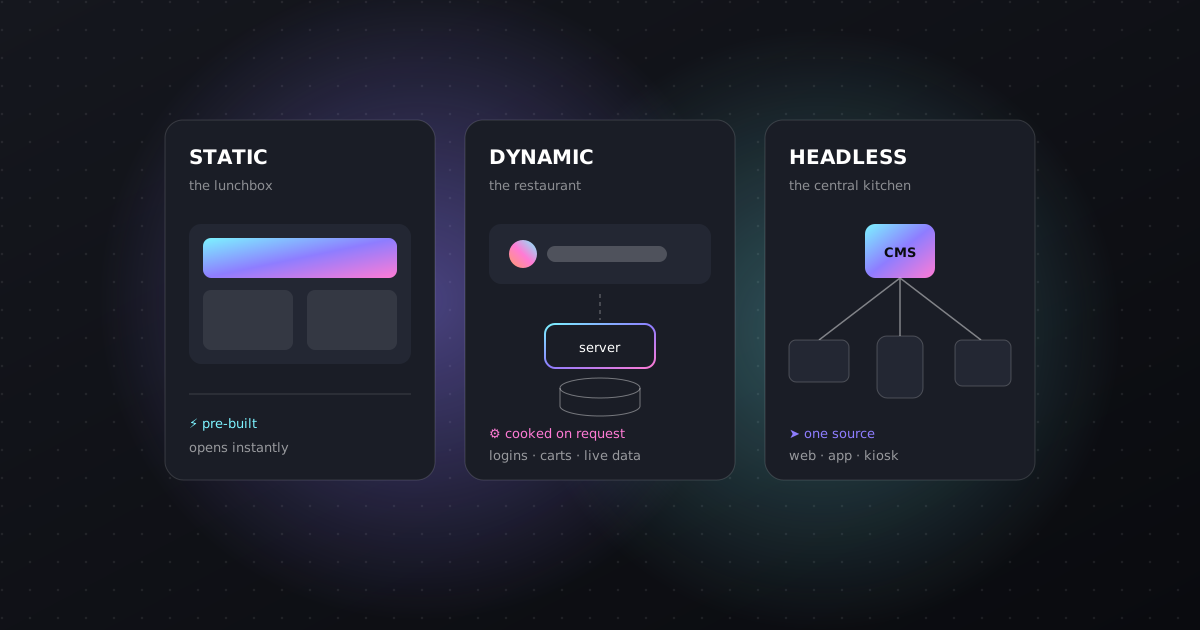
Imagine three ways to serve lunch. A packed lunchbox is made in the morning and is ready the moment you open it. A restaurant cooks each plate when you order. A central kitchen cooks food once and delivers it to many different shops, food trucks, and cafes. Websites work the same three ways — and once you see the analogy, the jargon stops being scary.
Static — the lunchbox
- Pages are prepared in advance, so they open instantly.
- Very little can break, and hosting is cheap.
- Best for: portfolios, landing pages, small business sites that change occasionally.
- Trade-off: changing content usually means a quick rebuild.
Dynamic — the restaurant
- Pages are “cooked” on each request, so they can be personal and always current.
- Needs a server and a database working together.
- Best for: stores, dashboards, member areas, anything with logins or live stock.
- Trade-off: more moving parts to maintain and secure.
Headless — the central kitchen
- Content lives in one place (a CMS) and is sent to many “fronts”: website, app, kiosk.
- The front can be fast and static while content stays easy to edit.
- Best for: growing brands publishing to web and app, or teams of editors.
- Trade-off: more setup up front.
Four questions that pick the right one
- [01]
How often does your content change?
Once a month → static is perfect. Every hour, or per visitor → you need dynamic parts.
- [02]
Do people log in or buy?
Accounts, carts, and payments need a server somewhere. That’s dynamic (even if the rest is static).
- [03]
Where else will the content appear?
If the same products or articles must show in an app too, headless saves you from typing everything twice.
- [04]
Who edits the site?
If non-technical people update it often, they need a friendly editor (a CMS) — which points toward headless.
A worked example
Say you run a paint shop. Your services page and gallery rarely change — static. You want customers to request a quote with a form — a small dynamic piece. Next year you plan an app that lists the same colours — that’s when a headless CMS starts paying off. Notice we didn’t pick one label for the whole business; we picked the right tool for each job.
Common mistakes
- Building a heavy dynamic system for a five-page brochure site — you pay for complexity you never use.
- Choosing static for a store with live stock — and then fighting it with workarounds.
- Going headless with no plan for who will edit content — a central kitchen with no cooks.
A photographer’s portfolio updated twice a year. Which fits best?
Static — fast, cheap, and simple. A form service can handle enquiries.
An online store with live inventory and checkout?
Dynamic for the cart and stock, often with static product pages for speed.
A brand publishing the same catalogue to a website and a mobile app?
Headless — one source of content feeding both.
- Static = prepared ahead, fastest and simplest.
- Dynamic = made on request, needed for logins, carts, and live data.
- Headless = one content source feeding many fronts.
- Choose per job, not per label — most good sites mix them.
Want this done for your business?
Start a project